> For the complete documentation index, see [llms.txt](https://akabizauto.gitbook.io/support/llms.txt). Markdown versions of documentation pages are available by appending `.md` to page URLs; this page is available as [Markdown](https://akabizauto.gitbook.io/support/xu-ly-cac-van-de/khong-hien-thi-web.md).
# Không hiển thị web
## **Cài đặt quyền admin cho phần mềm**
### **Cơ chế**
akaBiz sẽ thực hiện các chiến dịch bằn cách điều khiến trình duyệt Chorme (Mở, đóng, điều khiển), vậy nên akaBiz cần quyền đăng nhập dưới dạng admin để có thể điều khiến ứng dụng thứ 3 - chorme
### **Hướng dẫn**
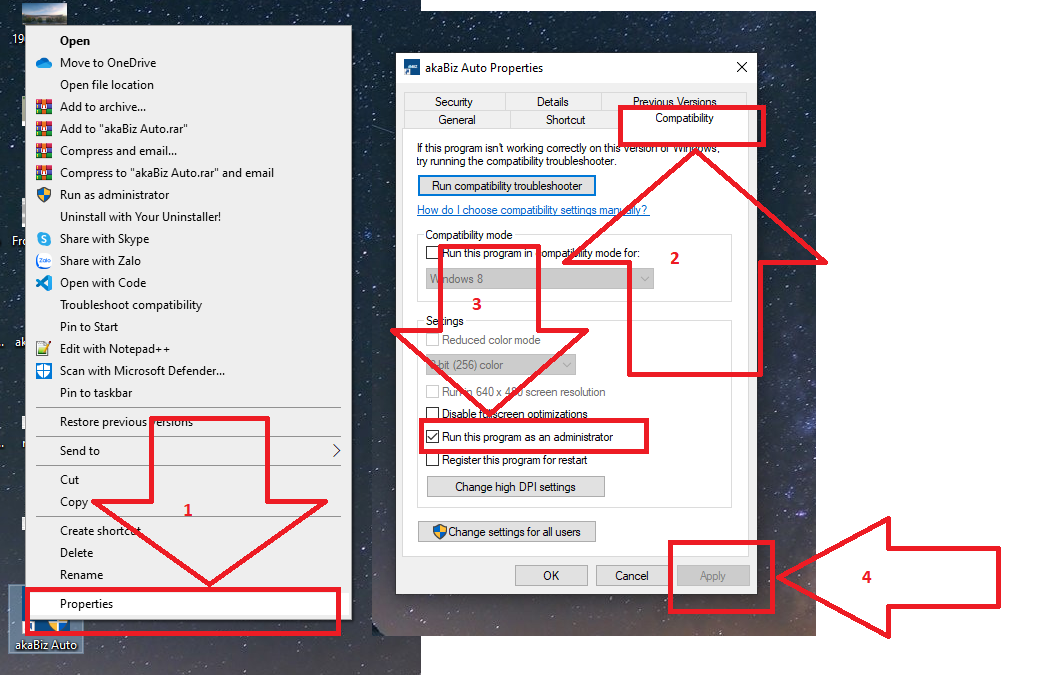
1. Tắt app akabiz nếu đang mở
2. Chuột phải vào ứng dụng→ chọn properties
3. Chọn tab Compatibility → Tích chọn Run this program
4. Click Apply → Ok
5. Mở App akabiz lại
## **Lưu ý**
Sau khi đã cài đặt, thì từ lần sau chỉ cần mở app akabiz mà không cần cài đặt lại mục này nữa